
Embedded Components
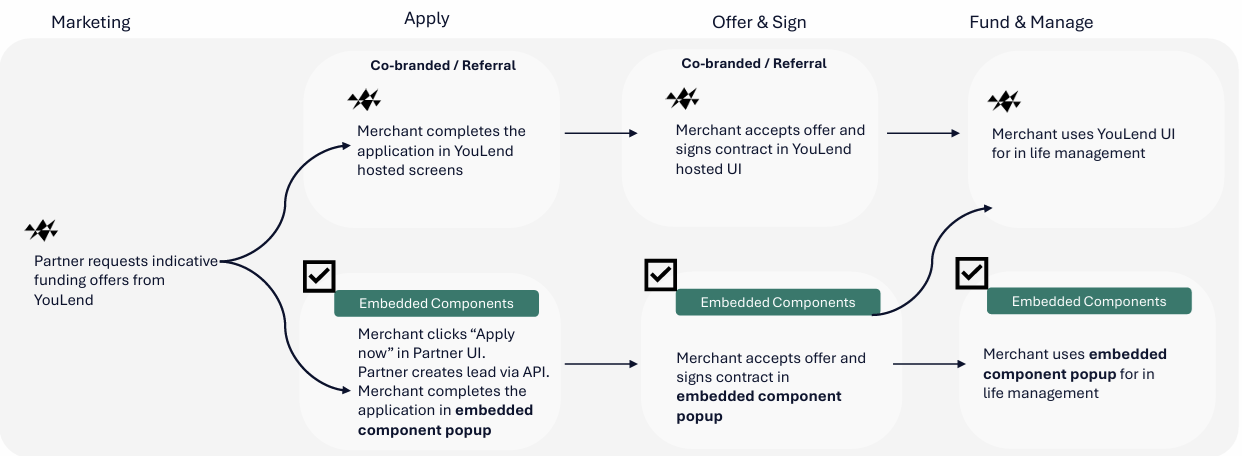
Add YouLend’s funding application journey to your dashboard with Embedded Components. YouLend provides and maintains the application screens; your integration connects each merchant to their application and controls when the experience opens.
The ApplicationJourney component opens in a modal within your dashboard. Merchants can provide application details, submit their application, review available offers, and sign their contract through your configured YouLend journey, without a separate YouLend login.
Embedded Components
The merchant experience
The component opens the relevant screen for the merchant’s current application state. For example, if you have already supplied business and owner or director details through the API, the merchant can continue with the missing financial information.
Resume an application
Merchants can return to an application using the same customer identifier. Resume their existing application rather than create a new lead whenever they reopen the component.
Partner-branded journey
YouLend manages the screens and application flow. The experience uses the branding configured for your partner journey, including its colours and partner name. Ask your YouLend implementation contact to confirm your journey configuration and supported markets before you begin.
How the integration works
- Your backend authenticates with the YouLend API, creates the merchant’s lead, and requests a short-lived embed token for that merchant. You can also provide application data you already hold, such as owner or director details.
- Your frontend loads the YouLend library, creates an
ApplicationJourneycomponent, and opens it when the merchant is ready. The library requests fresh tokens through a callback to your backend when needed.
Use the same thirdPartyCustomerId in the lead, embed-token request, and component configuration. This is your stable identifier for the merchant, not a new identifier for each visit.
Opening the component does not create a lead. Your backend must create the lead first, using
leadType: 'Embedded'.
What you will need
- Obtain YouLend API access for the environment you are using.
- Set up a backend that can securely create leads and request merchant-specific embed tokens.
- Get the
partnerNamevalue from YouLend for your configured journey. - Prepare a dashboard that can load the JavaScript library and display the component’s modal.
The embedded web journey has also been tested in Android WebView and iOS WKWebView. See the WebView configuration requirements and test the complete journey on the devices your app supports.
Start building
Updated 22 days ago