
Re-routing (YouLend manages the sweep)
For this solution, YouLend are responsible for splitting the funds. This solution requires no development work from the partner because no calculation of the sweep or withholding of funds needs to take place at the partner level.
This rerouting approach is the standard method we use across all our payment processing partnerships. It’s also widely adopted for routing payments from acquirers we’re not partnered with.
There are 3 ways that this can be adopted:
- Automated process powered by API
- Offline process, arranged by Partner and YouLend
- Offline process, arranged by merchant
These solutions all work identically after a merchant is funded, the differences are entirely in the set up. After a merchant is funded the flow is:
- Each day, the merchant's payout from the partner gets sent to the YouLend virtual accounts (one payment per account, one account per merchant).
- When funds reach this account, YouLend will retain the sweep % owed and forward the remaining funds on to the merchant immediately.
- Merchants can track their settlements via their YouLend dashboard, which clearly displays daily sales, repayments, and amounts settled. (See attachment.)
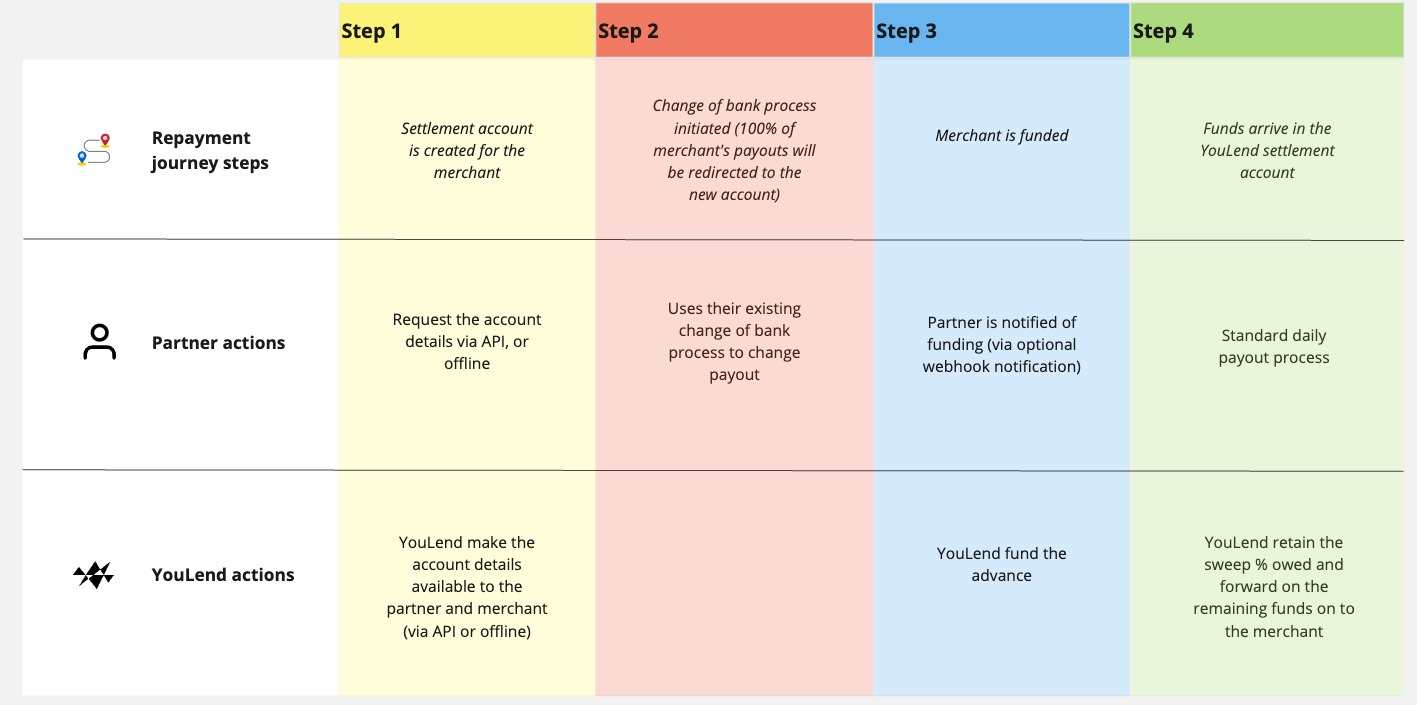
Offline process, arranged by Partner and YouLend
This is our most common approach for non-integrated or minimally integrated partners. It requires no technical development and minimal operational effort from the partner, while providing a smooth merchant experience.
Operational procedure for funding
- Merchant is approved for funding
- YouLend notifies partner via a dedicated email inbox, sharing merchant details and the relevant YouLend virtual account.
- YouLend disburse the funds
- Partner change the payout bank account for the merchant within 24-48 hours
Offline process, arranged by merchant
This option is used when our partner lacks the resources to assist directly, or when rerouting flow from a non-partner acquirer.
Operational procedure for funding
- Merchant is approved for funding
- YouLend provides merchant with a virtual account and instructions for updating their partner payout
- Merchant completes the update
- Partner processes the change via their standard change of bank process
- YouLend receives settlement from the next batch
- YouLend disburses funds
Automated process powered by API
Use the automated change of bank process when the merchant’s payout or settlement route needs to be updated to the YouLend settlement account before funding can proceed.
YouLend will notify you when the settlement account details are ready. You should then retrieve the account details, update the merchant payout route on your side, and confirm back to YouLend once the change has been completed.
Funding will not proceed from YouLend until the change of bank process has been completed.
How it works
The merchant accepts and signs their funding agreement.
YouLend creates the settlement account for the lead.
YouLend sends a webhook notification when the settlement account details are ready.
You retrieve the settlement account details from YouLend.
You update the merchant payout bank account in your system.
You confirm completion to YouLend, and funding can continue subject to standard checks.
1. Receive the settlement account ready webhook
YouLend will send the ONB10035 webhook when the settlement or repayment account details are ready to fetch.
Example event:
{
  "EventCode": "ONB10035",
  "Message": "The Settlement/Repayment account details are ready to fetch from the AOL endpoint to begin the re-routing process",
  "EventProperties": {
    "LeadId": "511898ff-3a66-4ebd-8508-22c94c05416e"
  }
}
Use the LeadId from the webhook to retrieve the settlement account details.
Call the account opening letter endpoint using the LeadId from the webhook. This endpoint returns the settlement account details that should be used for the merchant’s payout route.
Example response:
[
  {
    "iban": "DK7389000112017272",
    "virtualIban": "DK8389222292389284",
    "secondaryVirtualIban": "GB85SAPY62838292389284",
    "accountName": "Test Company Limited - SXP Settlement - GBP",
    "currencyISOCode": "GBP",
    "accountOpeningLetter": {
      "documentId": "7fd7c2b5-37fc-4df8-a710-dbfbf5a5cef1",
      "document": "JVBERi0xLjYKJeLjz9MKMjI",
      "documentName": "Test Company Limited - Account Opening Letter.pdf",
      "documentType": "application/pdf"
    },
    "domesticAccountNumber": "92389284",
    "domesticSortCode": "628382",
    "partner": "Test Account",
    "swift": "SXPYDKKK",
    "thirdPartyCustomerId": "89ab144"
  }
]
virtualIbanandsecondaryVirtualIbanhave the same destination.virtualIbanis typically a DK IBAN, whilesecondaryVirtualIbanis local to the merchant. Partners can decide whether to send international or domestic repayments.
3. Update the merchant payout route
Once you have retrieved the settlement account details, update the merchant payout or settlement bank account in your system.
Only confirm completion to YouLend once the account update has been completed.
After the merchant payout route has been updated, notify YouLend that the change of bank process is complete. This endpoint marks the change of bank process as complete for the lead.
Important rules
- Only call the completion endpoint once the payout route has been updated.
- The
leadIdused to retrieve the account details should be the sameleadIdused to confirm completion. - If the account update fails, do not call the completion endpoint.
- If the settlement account details cannot be applied, contact YouLend through the agreed channel.
Related API reference
- Webhook events
- List settlement details with an account opening letter
- Complete change of bank process
Updated 4 months ago